Philips 3200 LatteGo Review (2026)

Jack · Founder & Lead Reviewer
Researches every machine through engineering analysis, long-term owner reports, and independent technical testing, including Italian and German sources most English-language reviews skip.
Last updated
 4.2
4.2
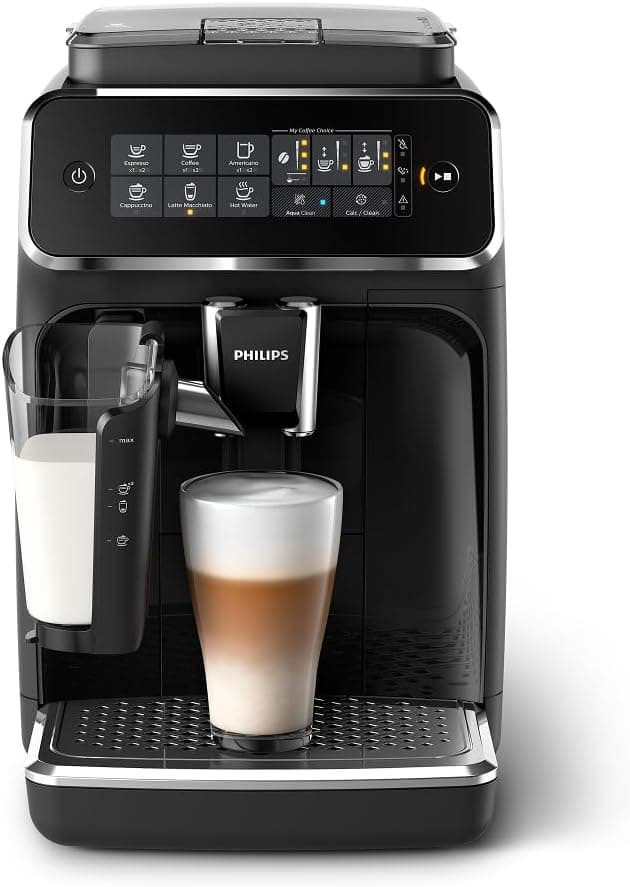
Two parts. No tubes. That's the whole pitch of LatteGo, sometimes listed by retailers as the Philips LatteGo 3200, and it explains why Philips leans on it so hard in the marketing. Most automatic milk frothers cake up inside hidden channels you can't reach with a brush. This one snaps apart by hand. The Philips 3200 also packs a ceramic flat burr grinder, genuinely rare at this price tier. Neither strength erases the machine's two real, well-documented weak points: a grinder that runs louder than most competitors, and a thin five-drink menu.
The verdict up front
The 3200 wins on cleanup and grinder quality, and that's enough for plenty of buyers. It loses points on grinder noise and a thin five-drink menu. Buy it for the LatteGo system and the ceramic burrs. Go in knowing both tradeoffs before you decide.
The LatteGo system: why it's the easiest to clean
Most automatic milk frothers route milk through a loop of internal tubing, which is also exactly where bacteria and dried milk solids accumulate between cleanings. LatteGo skips that architecture entirely. It's a two-part carafe: a base and a lid, magnetically held together, with milk passing between them in a straight line instead of looping through a hose.
Pop the two halves apart, hold them under the tap, snap them back together. It's a quick rinse, no soaking, and dishwasher-safe too if you'd rather not stand at the sink. That's the single biggest reason LatteGo milk systems don't get gross the way carafe-and-tube systems do over a few months of daily lattes.
Independent reviews describe the foam as good, silky, and consistent, and the cappuccino setting comes close to café quality for a machine this size. It works with oat, almond, and soy milk, though plant milks generally foam thinner than dairy, a limitation of the underlying physics more than this specific machine. One tradeoff worth knowing: automatic foam like this tends to run thicker and more uniform than what you'd get hand-steaming with a wand. Purists who want to shape microfoam by feel will find LatteGo gives them one texture, not a range to work within.
The ceramic grinder (rare at this price)
Open the bean hopper and there's a small dial, 12 settings, fully ceramic flat burrs. Most machines under $600 ship with steel. Ceramic matters for two practical reasons: it runs cooler during back-to-back grinding, which means less heat degradation of aroma compounds, and it holds its edge longer than steel, so the grind stays consistent further into the machine's life.
It's also not subtle about the tradeoff. Coffeeness and other independent reviewers flag this grinder as noticeably loud, louder than many conical-burr competitors in this price range. If you're making coffee early while someone else is asleep down the hall, that's worth knowing before you buy, not after.
Twelve settings is plenty for someone buying one or two bean types and sticking with them. It is not Breville territory, the Breville Barista Pro runs 30 settings on its grinder, which gives finer resolution for chasing a specific light-roast extraction. The Philips trades that precision for simplicity, and for most daily drinkers, 12 steps is enough to land somewhere good.
Philips itself recommends adjusting the grind dial only while the grinder is running, one step at a time, and advises against changing the setting at all during the first 100 to 150 cups, to avoid stressing the burrs before they've bedded in. Oily dark-roast beans are also worth avoiding in any ceramic burr grinder at this price tier, since oil residue is harder on the mechanism than dry-surface medium roasts.
How the coffee tastes
Five one-touch drinks: espresso, coffee, cappuccino, latte macchiato, and americano. Press one button and the machine handles grinding, dosing, and extraction in a single pass, no manual steps in between.
Expect balanced espresso: moderate body, mild acidity, and crema thinner than what you'd pull on a manual machine with a fresh-tamped puck, the tradeoff every super-automatic makes. Medium roasts tend to give the most consistent results on a fixed one-touch program like this; very light or very dark roasts push against the edges of what the machine can compensate for automatically.
The "My Coffee Choice" function lets you adjust both strength and volume per drink and save it, which matters more than it sounds, dialing in your own americano once means you never touch the settings again. For the price, the cup quality is honestly above what this tier usually buys. It won't replace a dialed-in semi-automatic, but it doesn't pretend to.
AquaClean: 5,000 cups before descaling
The AquaClean filter is the other piece of low-maintenance design here. Philips markets it as pushing the descaling interval out to roughly 5,000 cups before the machine needs a full descale cycle, a manufacturer claim rather than independently verified, and real-world mileage depends heavily on your water hardness. Even cautious buyers in hard-water regions should still see months, not weeks, between descales. For an estimate based on your actual water and daily cups, the descaling calculator accounts for the AquaClean extended baseline.
The brew group pulls straight out and rinses clean in the sink. No service menus, no calling support to reset an error code after a clean, you just rinse the part and put it back.
The recommended maintenance routine is light: rinse the LatteGo carafe daily, pull and rinse the brew group weekly, swap the AquaClean filter when the display flags it, and run a cleaning tablet cycle every few weeks. None of it takes more than a couple of minutes. As far as bean-to-cup machines go, this is a genuinely low-chore ownership experience on paper.
Long-term ownership: what's actually documented
I didn't find independent lab testing or a large-sample owner survey that documents a specific failure rate for this machine, and neither of the two most detailed independent reviews I drew on for this piece, Coffeeness and homecoffeeexpert, flags pump failures, grinder jamming, or error codes as a known problem. If anything, homecoffeeexpert's own estimate, based on Philips' claimed 20,000-cycle grinder rating, puts expected grinder life at well over a decade for a typical daily user, and the reviewer expects the machine itself to last five years or more with reasonable care.
Individual owner complaints exist for almost any super-automatic on forums and retailer review sections, and this machine is no exception, but I'd treat isolated complaints as exactly that rather than a documented trend, absent a source that actually quantifies how common they are.
The standard advice for any machine in this category still applies: register the warranty the day it arrives, run filtered water through the AquaClean system rather than straight tap water, avoid oily dark-roast beans in the grinder, and keep the brew group rinsed and the seals in good condition. None of that reflects a known 3200-specific weakness, it's just good practice for getting the most life out of any bean-to-cup machine.
One more thing worth flagging before you buy, separate from the reliability question: homecoffeeexpert states that the Philips 3200 has been discontinued and replaced by the Philips 3300, with remaining listings representing old stock, sometimes at inflated prices. I found this claim in only one source, so I'm not treating it as settled fact, but if it's accurate it changes the buying calculus here. Check current availability and pricing carefully before you commit, and weigh it directly against the Philips 3300 rather than assuming the 3200 is a stable, long-term line.
Common issues and fixes
Pre-ground function is finicky. There's no true bypass doser, so even when you select "no grinding," the grinder sometimes activates anyway, and the AquaClean light occasionally turns orange afterward. The workaround: use the pre-ground slot exactly as the manual describes, small amounts, tamped lightly, lid fully closed, and don't expect the machine to treat it as gracefully as fresh beans.
Weak crema after a few months. Usually a maintenance issue, not a defect. Pull and rinse the brew group, lightly lubricate it with food-safe grease if it's running dry, replace the AquaClean filter if it's overdue, and run a cleaning tablet cycle. Crema usually comes back within a day or two of doing all three.
Error lights or the machine won't brew. Start with the brew group: remove it, check the O-ring for cracking or displacement, rinse everything, and reseat it firmly until it clicks. Many error codes on super-automatics like this trace back to the brew group not seating correctly rather than anything electrical. For descaling steps and general upkeep, my how to descale an espresso machine guide covers the process in more detail.
Philips 3200 vs 4300 vs 5400 (which to buy)
All three share the same bones: the same brew group, the same LatteGo carafe, AquaClean, and a ceramic grinder. What changes is the interface and drink count.
The 3200, this machine, runs an icon display and five drinks. Fine for a single person or a small household that wants espresso, coffee, americano, cappuccino, and latte macchiato and nothing more exotic.
The 4300 and 5400 step up to a color display, more drink presets, and saved user profiles so two or three people in the same house can each have their own settings remembered. You're paying for the screen and the extra recipes, not a fundamentally better cup.
My take: stay on the 3200 unless you specifically want flat whites, cortados, or multi-person profiles. The core hardware doesn't change between tiers.
Philips 3200 vs the competition
Against the De'Longhi Magnifica Evo: De'Longhi generally pulls a fuller-bodied shot and its LatteCrema upgrade textures milk a bit closer to a real steam wand. The Philips answers back with the easier-to-clean LatteGo system and the ceramic grinder neither Magnifica Evo tier offers at this price.
Against the Ninja Luxe Café: different category entirely. Ninja's machine is closer to a guided portafilter experience than a true super-automatic, so the comparison is really about how much manual involvement you want. My Ninja Luxe Café vs Philips 3300 LatteGo comparison covers that tradeoff against the Philips 3200's closest sibling, worth a look given the discontinuation question flagged above.
For the full field at every price point, my best super-automatic espresso machines guide ranks where the 3200 lands against six other machines.
Who should buy the Philips 3200 LatteGo?
Buy it if: you want the easiest milk-system cleanup in the category, daily cappuccinos with zero technique required, and a ceramic grinder at a budget price, and a bit of grinder noise doesn't bother your household.
Skip it if: grinder noise in a quiet kitchen is a dealbreaker, you want the fullest espresso body in class (look at the De'Longhi), or you want hands-on control over grind, dose, and extraction rather than a sealed one-button system.
Is the Philips 3200 LatteGo reliable?
I didn't find independent lab testing or a large-sample owner survey documenting a specific failure rate for this machine, and neither of the two most detailed independent reviews I checked flags pump failures, grinder jamming, or error codes as a known problem. One reviewer's own estimate, based on Philips' claimed 20,000-cycle grinder rating, puts expected grinder life at well over a decade for typical daily use. General good practice still applies: register for warranty coverage, use filtered water with the AquaClean system, avoid oily dark-roast beans in the grinder, and keep the brew group clean. That's sound advice for any bean-to-cup machine, not a sign this one has a documented problem.
How often do you descale the Philips 3200?
The AquaClean filter is designed to push the interval out to roughly 5,000 cups before a full descale is needed, instead of the usual 2-3 month cycle on machines without a comparable filter. Real-world timing depends on your water hardness, hard tap water shortens the interval even with AquaClean installed. The display alerts you when it's due, and the brew group itself rinses separately under the tap as part of routine weekly maintenance.
What's the difference between the Philips 3200, 4300, and 5400?
All three share the same core hardware: the same brew group, the LatteGo milk system, AquaClean filtration, and a ceramic flat burr grinder. The 3200 has an icon display and five drinks. The 4300 and 5400 add a color touchscreen, more drink presets, and saved user profiles for multiple people in the same household. You're paying for the interface and recipe count, not a meaningfully different cup.
Can you use pre-ground coffee in the Philips 3200?
There's a pre-ground slot, but no true bypass doser, so results are inconsistent, the grinder occasionally activates anyway even when pre-ground is selected, and the AquaClean light has been known to flag afterward. If you need pre-ground for decaf or a specialty blend, use small amounts, tamp lightly, and close the lid fully before brewing. It works, but treat it as a workaround rather than a core feature.