
De'Longhi La Specialista Touch Review (2026)

Jack · Founder & Lead Reviewer
Researches every machine through engineering analysis, long-term owner reports, and independent technical testing, including Italian and German sources most English-language reviews skip.
Last updated
 4.4
4.4
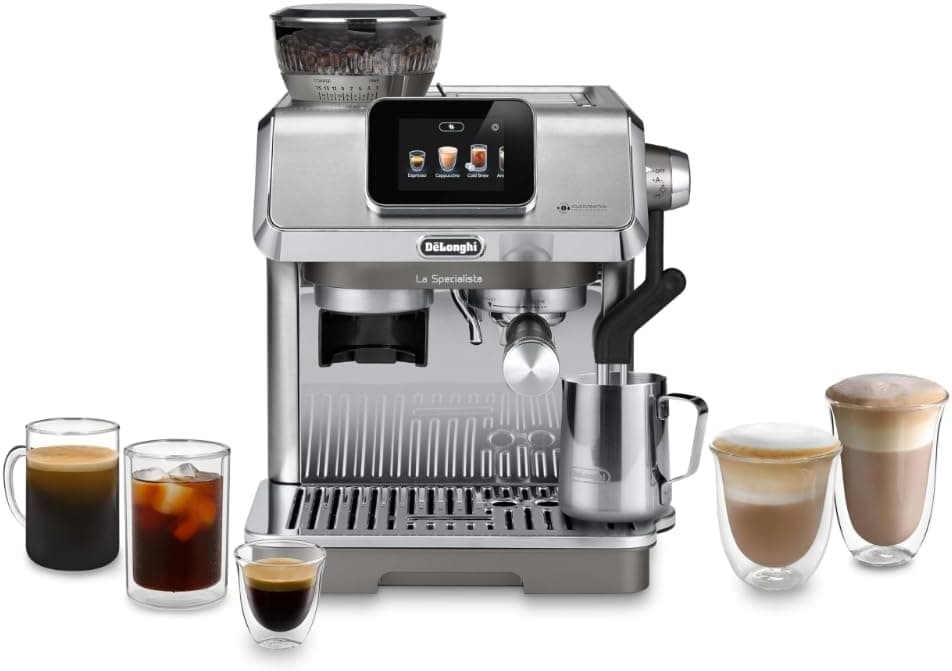
De'Longhi built a machine that starts with a quiz. Before your first shot, the La Specialista Touch runs through a short questionnaire about your beans, roast level, origin type, blend or single-origin, and returns a recommended grind setting, dose, and brew temperature. Bean Adapt, they call it. Whether it's genuinely smart or carefully branded automation is the first question worth digging into here.
It's aimed directly at Breville's touchscreen lineup. Cold brew in roughly five minutes, a dual heating system, ten drink presets. Two real critiques before anything else: the dosing scale has so few graduations it's almost useless without a separate coffee scale, and there's no knock box included. At this price point, both are genuine omissions.
The verdict up front
The La Specialista Touch earns its price if guided setup, fast cold brew, and plant milk support are priorities. Its weaknesses are specific: 15 grind settings, a vague dosing dial, no knock box. Know the tradeoffs going in.
Which La Specialista is this? (Clearing up the lineup)
De'Longhi's La Specialista family runs five models across a surprisingly wide price range. The naming is not helpful.
The Arte (EC9155M) and Arte Evo (EC9255M) are the entry tier of the range. Both have a tamping station with a pressure sensor and an active-temperature steam wand. The Arte Evo adds dual heating over the base Arte, which matters for simultaneous brewing and steaming. No touchscreen on either. No cold brew.
The Touch (EC9455M) sits in the middle of the range. It adds the color touchscreen, Bean Adapt, ten drink presets with five milk texture settings, and the pressure-assisted cold brew function. Dual heating is standard at this tier.
The Maestro and Opera are the premium tier of the range. They add a pressure gauge on the front panel, more accessories in the box, and upgraded construction. For dialing in manually and watching the pressure curve in real time, the Maestro is the better choice. For most home use, the Touch hits the right spot.
Bean Adapt: the quiz that dials in your coffee
Here's what the interaction actually looks like. On first launch, the touchscreen prompts: select your roast level (light, medium, dark) and your bean type (single-origin or blend). The machine cross-references that input with its internal database and presents a starting grind setting, dose, and brew temperature. No guessing. No forum rabbit hole.
On medium-roast Central American single-origins, the recommendations landed close. Bean Adapt suggests a starting grind that gets you close, though lighter roasts from regions like Ethiopia and Kenya usually need further adjustment, and that's where the grinder shows its limits. You still do the final tuning yourself.
The hard ceiling: 15 grind settings. That is the full range. Breville's Barista Express Impress has 25. With only 15 steps, you sometimes can't split the difference between two grind settings, which bites most on light roasts that want a finer point than the dial offers. Medium and dark roasts are more forgiving, 15 steps is adequate for most roast levels. Light roast drinkers will find the resolution too coarse, a genuine constraint rather than a minor caveat.
For beginners, Bean Adapt delivers on what it promises. You'll pull acceptable espresso on day one without knowing what extraction yield means. For anyone who already knows their grinder, treat Bean Adapt as a starting point and expect to override it.
How the espresso tastes
You can set the brewing temperature across four steps, 90 to 96°C, and because the Touch pairs a coffee thermoblock with a separate milk heater, there's no wait between pulling a shot and steaming milk. De'Longhi markets this as PID temperature control. It holds heat well enough for consistent results at the price, though true-PID rivals like the Breville Barista Touch still have the edge on outright precision.
The 51mm portafilter extracts correctly when the grind is dialed in. Crema is thick and persistent. Flavor is balanced on medium roasts, not as sharp as what a 58mm commercial basket pulls, but the gap is narrower than the portafilter size implies.
Back to the dosing scale: the markings on the dose dial are too coarse. The integrated grinder has 15 steps, fewer than the 25 on the Breville Barista Express Impress, and reviewers note it struggles to grind fine enough for light roasts and can be awkward to clean. The smart dosing and tamping tools genuinely help, but that grind range is the real constraint if you favour lighter coffees. A machine in this price class should not have this problem. Buy a separate coffee scale and use it alongside this one.
Cold brew in 5 minutes
This is the feature most buyers don't know they want until they have it. Traditional cold brew steeps in cold water for 12–24 hours. The La Specialista Touch uses pressurized cold extraction to produce cold brew concentrate in about five minutes, poured over ice.
The result is smooth, low-acid, and noticeably different from a regular iced espresso or a shot diluted with cold water. Purists will note that pressure-extracted cold brew differs from slow-steep: richer, slightly less nuanced on very complex single-origins. For everyday iced coffee, that distinction disappears. The drink is genuinely good.
Nothing else at this price point does this. Breville's touchscreen machines don't offer it. If iced drinks are a regular part of your morning, this alone might be the deciding factor.
Milk and drinks
Ten presets cover espresso, double espresso, americano, cappuccino, flat white, latte macchiato, hot chocolate, and cold brew variants. The milk system offers five texture settings, from dry cappuccino foam to flat white microfoam. These settings are designed to work with oat, almond, and soy milk, not just whole dairy. The milk system is the standout. The Auto LatteArt wand uses a temperature probe to steam dairy or plant milk hands-free, across four temperature settings, and reviewers rate the automatic results close to Breville's. Two honest caveats: on automatic the foam can come out slightly stiff and a touch hotter than the setting, and manual steaming is awkward because the probe and the wand's fixed mount make a good vortex hard to find.
The Auto LatteArt wand produces consistent milk with minimal effort, and with a little practice it can yield latte-art-ready texture. Manual frothing remains an option if you want to override the presets and work the wand yourself.
Where it falls short
Fifteen grind settings. I keep coming back to this because it's the most practically significant limitation. The Breville Barista Express Impress offers 25. On medium and dark roasts it's workable. On light roasts, anything washed, anything with fruit-forward complexity, 15 steps means you're committing to "close enough" rather than landing precisely. If single-origin light roasts are your primary beans, this machine will frustrate you.
The dosing scale. The graduated dial on the machine lacks fine enough markings to dose accurately by reference. This is fixable, buy a $30 coffee scale, but it shouldn't be a problem on a machine at this price. It is.
No knock box. The puck has to go somewhere after every shot. Nothing extra is included in the box. Add it to the purchase list.
51mm portafilter. Not the 58mm commercial standard. Aftermarket baskets exist. IMS makes good 51mm options, but the ecosystem is narrower. If accessories and upgrades matter to you, this is worth knowing before you buy.
La Specialista Touch vs Breville Barista Express Impress
The Breville Barista Express Impress runs noticeably more. It has 25 grind settings versus 15 here, plus the Impress Puck System's auto-dosing and auto-tamping, which removes two of the four main espresso variables from your hands. It uses a single Thermocoil though, which means you wait between brew and steam steps. Cappuccino requires two separate phases.
Dual heating makes the De'Longhi faster for milk drinks. It has cold brew, which Breville doesn't offer. The plant milk texturing is more deliberately implemented with its five texture presets. But if grind precision is your priority, the Breville wins that matchup clearly.
Position the Touch as the machine for cold brew regulars, plant milk drinkers, and buyers who want guided setup without a steep learning curve. Breville is the better pick for people who want to dial in manually with more resolution. Either way, my best espresso machines guide puts both in context alongside the full field.
How to descale and maintain it
The touchscreen displays a descale alert when mineral buildup reaches the threshold, typically every 2–3 months under normal use, more frequently with hard tap water. The process: remove the water filter first (descaling solution destroys the filter media, this step gets skipped constantly and it shouldn't be), fill the tank with 1 liter of water mixed with a commercial descaling solution or citric acid powder, then follow the on-screen steps. The display walks you through the brew circuit, steam wand, and rinse phases.
White vinegar works in a pinch but it's slower, harsher on rubber seals over repeated use, and requires extra rinse tanks to clear the taste. Use a purpose-built descaler or citric acid. My how to descale an espresso machine guide covers solution types and timing in detail.
The manual is available on De'Longhi's website under the EC9455M model number. Replacement parts, 51mm portafilter baskets, water filters, drip tray components, are sold directly through De'Longhi and are available from third-party sellers. Daily maintenance: flush the group head after each shot, purge and wipe the steam wand immediately after frothing, brush the grinder chute every few sessions.
Who should buy the La Specialista Touch?
Buy it if: Bean Adapt's guided dial-in sounds genuinely useful, you want cold brew without an overnight steep, plant milk support matters in your household, or you value dual heating for faster cappuccino workflow. The touchscreen and presets make it one of the easier machines to hand to someone who's never pulled a shot.
Skip it if: you want maximum grind control, the Breville Barista Express Impress has 25 settings for $90 more. Skip it if a knock box and accessories in the box matter to you. And if the budget is the primary constraint, the La Specialista Arte covers the fundamentals for $150–200 less without the cold brew and touchscreen.
What size portafilter does the La Specialista Touch use?
The De'Longhi La Specialista Touch (EC9455M) uses a 51mm portafilter, smaller than the 58mm commercial standard found on machines like the Gaggia Classic Pro. Aftermarket 51mm baskets are available (IMS makes them) but the selection is narrower than the 58mm ecosystem. If you plan to expand into precision baskets, distributor tools, or tampers beyond what ships with the machine, keep the 51mm size in mind before buying.
What's the difference between the La Specialista Touch, Arte, and Maestro?
The Arte and Arte Evo are the entry tier of the range, tamping station with a pressure sensor, active-temperature steam wand, no touchscreen, no cold brew. The Arte Evo adds dual heating over the base Arte. The Touch (this machine) sits in the middle of the range: adds the color touchscreen, Bean Adapt guided dial-in, 10 drink presets with five milk texture settings, cold brew, and dual heating as standard. Check current pricing for the exact figure. The Maestro and Opera are at the top of the range, adding a pressure gauge for real-time extraction monitoring and more accessories in the box. Most home users get the most from the Touch; the Maestro suits serious manual dial-in.
Can the La Specialista Touch make real cold brew?
It makes pressure-assisted cold brew concentrate in approximately five minutes, served over ice. This is different from traditional cold brew, which steeps ground coffee in cold water for 12–24 hours. The result is smooth and noticeably low-acid compared to a standard iced espresso. Purists note it differs from slow-steep cold brew on complex single-origins: richer, slightly less nuanced. For everyday iced coffee drinking, that difference mostly disappears. No other machine at this price point offers the feature.
How do you descale the De'Longhi La Specialista?
The touchscreen shows a descale alert when it's due, typically every 2–3 months depending on water hardness. Remove the water filter before starting (descaling solution destroys the filter media). Fill the tank with 1 liter of water mixed with a commercial descaling solution or citric acid powder, then follow the on-screen prompts. The machine runs solution through the brew circuit and steam wand automatically, then prompts for two clean-water rinse cycles. Never skip the rinse phases, descaler residue will sour the next shot. My descaling guide covers solution types and full timing for reference.